Appearance
CardTestimonial
A testimonial showcase component that displays client feedback with optional photos, company information, and person details.

Overview
CardTestimonial displays case study testimonials with customizable elements including the client's photo, name, position, company, and testimonial message.
Key Features:
- Customizable testimonial message
- Person name, position, and company information
- Optional company logo and client photo
- Visibility toggles for each element
How to Edit
To customize CardTestimonial:
- Select the component — Click CardTestimonial directly on the canvas, OR find it in the Layers panel and click its name
- Open Properties — The Properties panel (right sidebar) displays all editable fields
- Make changes — Edit any property and see changes update in real-time
Property Controls
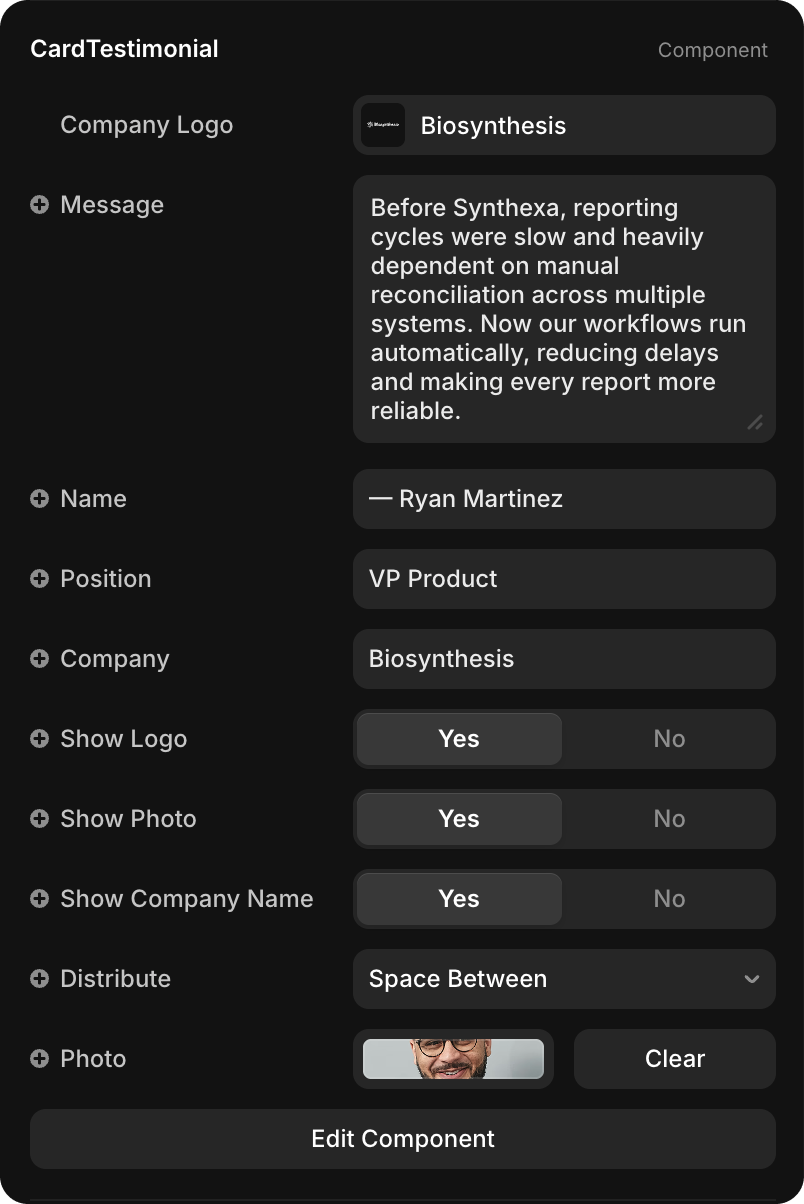
Content
| Property | Type | Description |
|---|---|---|
| Company Logo | Image | Logo of the client's company displayed at top |
| Message | String | Full testimonial quote from the client |
| Name | String | Client's name (typically with dash prefix, e.g., "— Ryan Martinez") |
| Position | String | Client's job title (e.g., "VP Product", "Chief Compliance Officer") |
| Company | String | Client's company name |
| Photo | Image | Portrait photo of the client |
Visibility
| Property | Type | Default | Description |
|---|---|---|---|
| Show Logo | Toggle | Yes | Display the company logo at the top |
| Show Photo | Toggle | Yes | Display the client's portrait photo |
| Show Company Name | Toggle | Yes | Display the company name next to the person's title |