Appearance
NotFoundGame
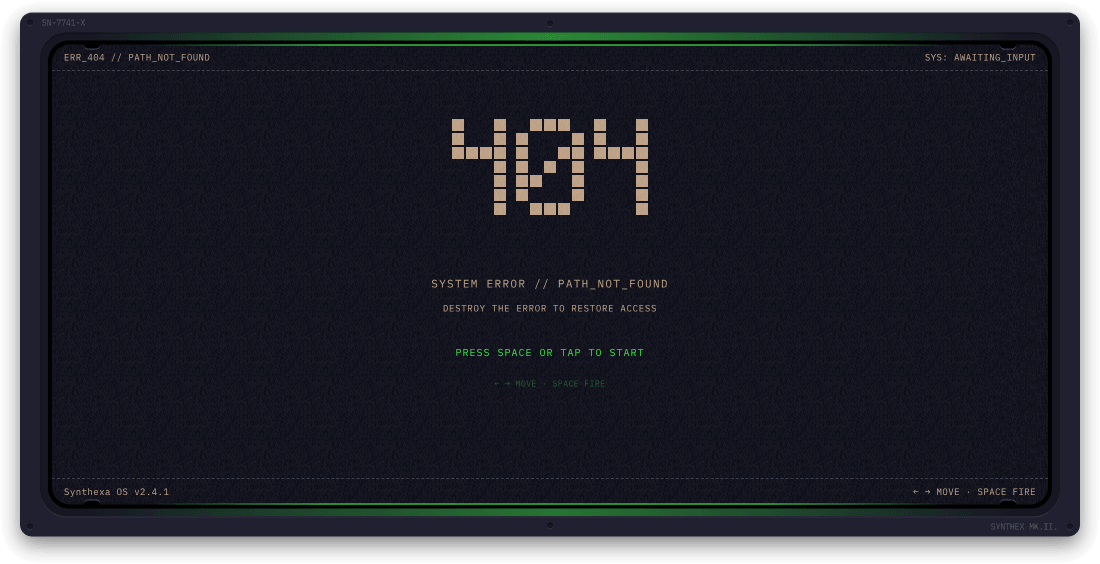
A fully playable two-phase retro arcade game that turns the 404 page into an engaging experience.
Overview
When visitors hit a missing page, they're welcomed with a fully playable arcade game instead of a boring error message.
Features:
- Two-phase gameplay (destroy 404 → scrolling shooter)
- Desktop (keyboard) and mobile (touch) controls
- Fully customizable colors and all text strings
- Lives and score tracking
- Retro pixel art aesthetic with IBM Plex Mono typography
How to Play
Phase 1 — Destroy the 404
Your ship appears at the bottom. Shoot the pixel letters "404" to destroy every block. Once all blocks are destroyed, Phase 2 begins.
Phase 2 — Scrolling Shooter
Enemy ships spawn from the top and move downward. Destroy them to score points. Enemies spawn faster as your score increases. Reach 2000 points to win.
Lives & Game Over
You start with 3 lives (shown as █ █ █ in the footer). Each time an enemy collides with your ship you lose one life. Lose all three — Game Over.
Controls
Desktop
| Control | Action |
|---|---|
| Arrow Left / A | Move ship left |
| Arrow Right / D | Move ship right |
| Spacebar | Shoot |
| Space (on idle/win/dead screens) | Start / restart |
Mobile
| Control | Action |
|---|---|
| Tap anywhere | Start / restart |
| Hold & drag left/right | Move ship (ship tracks finger position) |
| Auto-fire | Bullets fire automatically while holding |
Property Controls
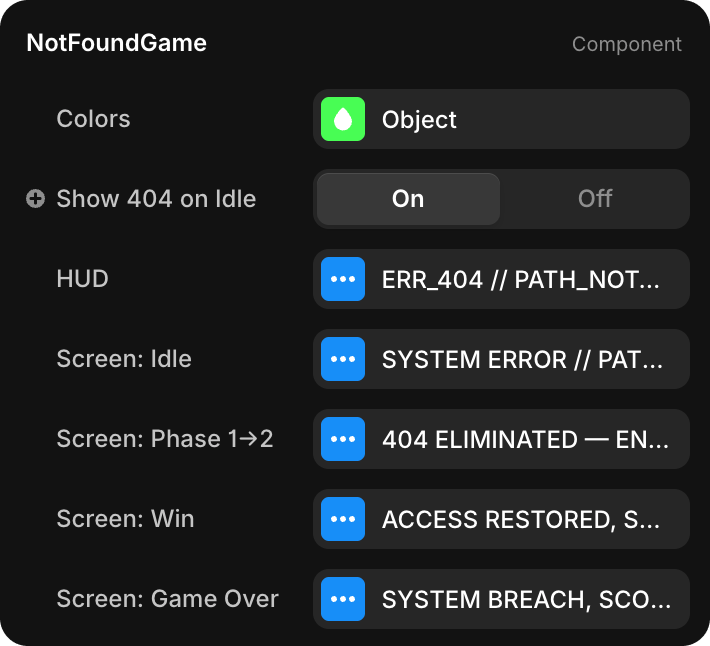
Colors
One Colors object controls the entire visual palette:
| Sub-property | Default | Applies To |
|---|---|---|
| Primary | rgb(0, 242, 0) | Ship, bullets, score display, CTA text, particles |
| Secondary | rgb(0, 242, 0) | Header and footer label text |
| Lines | rgba(0, 242, 0, 0.35) | Dashed border lines between header/footer and game area |
| Background | rgb(13, 13, 20) | Game canvas background |
| Enemy | rgb(217, 186, 154) | 404 pixel blocks and enemy ships |
Show 404 on Idle
| Property | Type | Default | Description |
|---|---|---|---|
| Show 404 on Idle | Toggle | On | Shows the pixel "404" digits in the background while the game is on the idle/start screen |
HUD
Fixed chrome strings shown in the header and footer bar at all times:
| Sub-property | Default | Position |
|---|---|---|
| Header Left | ERR_404 // PATH_NOT_FOUND | Top-left |
| Header Right | SYS: AWAITING_INPUT | Top-right |
| Footer Left | Synthexa OS v2.4.1 | Bottom-left |
| Score Label | SCORE: | Bottom-right (prefixes the score number) |
Screen: Idle
Text shown on the start screen before the game begins:
| Sub-property | Default |
|---|---|
| Title | SYSTEM ERROR // PAGE NOT FOUND |
| Subtitle | DESTROY THE 404 TO RESTORE NAVIGATION |
| CTA | TAP TO INITIALIZE |
| Controls Hint | DRAG TO MOVE · AUTO FIRE |
Screen: Phase 1→2
Brief message displayed in the center of the game area when the player destroys all 404 blocks and Phase 2 begins. Shown for 2 seconds, then disappears.
| Sub-property | Default |
|---|---|
| Message | 404 ELIMINATED — ENTERING DEFENSE MODE |
Screen: Win
Overlay shown when the player reaches 2000 points:
| Sub-property | Default |
|---|---|
| Title | ACCESS RESTORED |
| Score Label | SCORE: |
| Replay Label | TAP TO REPLAY |
Screen: Game Over
Overlay shown when all 3 lives are lost:
| Sub-property | Default |
|---|---|
| Title | SYSTEM BREACH |
| Score Label | SCORE: |
| Retry CTA | TAP TO RETRY |